Diamond Painting Neck and Back Pain: 7 Relief Tips
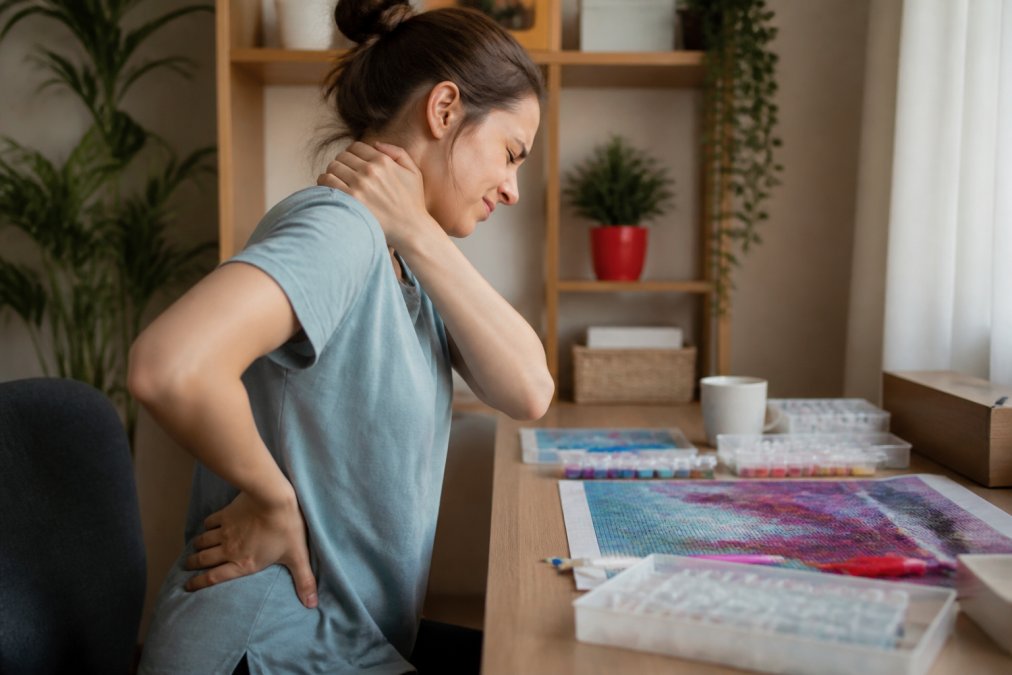
Table of Contents
- Why Diamond Painting Causes Neck and Back Pain
- Build an Ergonomic Diamond Painting Setup That Works for Your Space
- How to Prevent Neck Strain While Crafting: Posture and Positioning
- Stretches for Crafters: A Physical Therapy-Informed Routine
- Tools and Lighting That Reduce Physical Discomfort
- Micro-Breaks and Session Pacing for Long-Term Prevention
- When to See a Doctor About Crafting Pain
- Frequently Asked Questions
Last Updated: September 14, 2026
Why Diamond Painting Causes Neck and Back Pain
Diamond painting pain rarely comes from the craft itself. It comes from holding one position for hours while your head drifts forward and your shoulders round toward the canvas, which is why diamond painting pain builds so quietly. This guide from Jeanne Argent Atelier explains how to fix it.
Diamond painting is a seated, close-focus task: your eyes pull your head toward the canvas, your cervical spine follows, and the small muscles at the base of your skull stay contracted the entire session. Add a flat table that forces you to hunch, and you get neck tension, upper back strain, and shoulder fatigue that builds over weeks.
OSHA computer workstation ergonomics guidance describes the same pattern in office workers: sustained forward head posture loads the cervical spine and contributes to repetitive strain injury over time. Diamond painting replicates that posture, often for longer stretches and with finer hand movements on top.
Every cause here is adjustable. Below are seven relief tips, from rebuilding your ergonomic diamond painting setup to a five-minute stretching routine.
Build an Ergonomic Diamond Painting Setup That Works for Your Space
An ergonomic diamond painting setup is a work surface, chair, and canvas angle arranged so your spine stays neutral and your arms rest without reaching. Get those three right and the session takes care of itself.
Most guides assume a dedicated desk, but many diamond painters work from a sofa, bed, or recliner, where standard desk advice does not transfer. Below are three setups tuned to different environments, plus the chair and cushion choices that make each work.

Adjusting Your Work Surface Height and Angle
The right desk height lets your forearms rest roughly parallel to the floor with elbows near your sides. If your shoulders creep up, the surface is too high; if you lean forward to reach the canvas, it is too low.
Angle matters more than height. A tilted surface brings the canvas toward your eyes instead of pulling your head down to it, so the head stays stacked over the shoulders. Start with a modest tilt and increase it until you can read the symbols without leaning in.
To find your angle: sit tall, close your eyes, and open them looking straight ahead. Where your gaze lands is where the center of your canvas should sit. If the canvas is below that line, you will spend the session pulling your chin down to meet it.
Choosing the Right Chair and Cushioning
Lumbar support is the most useful chair feature for long sessions. A cushion that fills the curve of your lower back keeps the pelvis neutral and takes load off the upper back.
- Seat height: feet flat on the floor, knees at roughly 90 degrees
- Seat depth: two to three fingers of space behind your knees
- Backrest: contact along the lower back, not just the shoulder blades
- Armrests: low enough that your shoulders stay relaxed
If your chair has no lumbar curve, a rolled towel or wedge cushion behind the lower back works fine.
The two categories that matter most are drafting chairs and lumbar support cushions. A drafting chair's adjustable foot ring and higher seat let you sit closer to a tilted canvas without hunching, useful at a tall table or standing desk. A lumbar cushion fixes the lower-back curve on a chair you already own, the cheaper and more common fix. If your pain is mostly upper back and shoulders, the drafting chair helps more; if it is lower back, start with the cushion.
Sofa, Bed, and Recliner Setups
These are the setups most articles skip, and they cause the most pain, because soft furniture lets your spine collapse into whatever shape the cushions dictate.
Sofa setup. Sit in a corner rather than the middle for back support on two sides. Place a firm cushion or folded blanket behind your lower back to replace the lumbar curve the sofa lacks. Put a lap desk or large cutting board on your thighs to create a flat, angled surface, the single most important change, because it stops you bending your neck down to a canvas on your knees. Keep both feet flat; if the sofa is deep, add a footstool so your knees stay at hip height or slightly below.
Bed setup. Working flat on a bed is the worst position for your neck, forcing the head forward and down with no support. If you must work from bed, sit up against a firm wedge pillow or the headboard, bend your knees, and use a lap desk with a raised edge so the canvas tilts toward you; a bed tray with adjustable legs does the same job. Avoid lying on your stomach with the canvas in front of you, that loads the cervical spine for the entire session.
Recliner setup. A recliner can be a good diamond painting chair if used correctly. Recline only partway, enough to take pressure off the lower back, not so far that your head drops back and your arms reach forward. Use a lap desk or firm pillow to bring the canvas to eye level, and keep a small table beside you for trays and tools so you are not twisting to reach them.
Matching the Setup to Your Session Length
A setup that works for twenty minutes is not the same as one for two hours. For short sessions, a lap desk on the sofa is fine. For sessions over an hour, the desk or drafting-table setup pays off because it holds your posture without you thinking about it. If you regularly craft more than ninety minutes, an adjustable surface and a chair with real lumbar support most reliably reduce next-day stiffness.
How to Prevent Neck Strain While Crafting: Posture and Positioning
To prevent neck strain while crafting, keep your ears over your shoulders and your chin level, then bring the work to you rather than your head to the work. That single rule prevents most of the pain crafters report.
Forward Head Posture vs. Neutral Spine Alignment
Forward head posture is when the head sits ahead of the shoulders, forcing the cervical spine into extension and the rear neck muscles into constant contraction. It is the default for anyone reading fine print on a flat surface.
Neutral spine alignment means the head sits directly above the shoulders, the ribcage stacks over the pelvis, and the spine's natural curves stay intact. In practice:
- Chin tucked slightly, not jutting forward
- Shoulder blades settled down and back
- Feet supported, not wrapped around the chair legs
- Canvas raised so you look slightly down, not sharply down
A common mistake is raising the canvas but then sliding the chair closer so the head drifts forward again. Set the distance first, then the angle.
Stretches for Crafters: A Physical Therapy-Informed Routine
Stretches for crafters should target the muscles that shorten during a session: the upper trapezius, levator scapulae, and chest. A short routine done twice per session prevents stiffness from accumulating.
The routine below is a five-minute sequence you can do at your chair, with a clear order, hold times, and a way to tell whether it is working. It also addresses a cause most guides ignore, eye strain. When symbols are hard to read, you lean in, and the leaning loads your neck. Treating the eyes is part of treating the neck.
For a structured program, the American Physical Therapy Association patient resources publishes guidance on gentle mobility work for neck and upper back tension. The routine below follows the same principle: slow, held stretches, no bouncing, no forcing.
The Five-Minute Routine (Do It in This Order)
Order matters: release the muscles that pull the head forward, mobilize the upper back, then strengthen the muscles that hold good posture. Random order gets you less benefit for the same five minutes.
Minute 1, Release.
- Chin tucks: Sit tall, draw the chin straight back as if making a double chin. Hold five seconds. Repeat ten times. This is the single most useful move for forward head posture, and the one to keep if you only have a minute.
- Levator stretch: Turn your head 45 degrees, look down toward your armpit, and use your hand to add gentle pressure. Hold 20 to 30 seconds per side. You should feel this along the side of the neck, not the front.
Minute 2, Mobilize.
- Shoulder rolls: Roll the shoulders up, back, and down ten times, then reverse. Keep the movement slow; fast rolls do not release anything.
- Thoracic extension: Sit with hands behind your head and gently extend the upper back over the chair. Hold five seconds, repeat eight times. This counteracts the rounded upper back that builds during a session.
Minutes 3-4, Lengthen.
- Doorway chest stretch: Place forearms on a doorframe, step through gently, and hold 30 seconds. This counters the rounded-shoulder position that pulls the head forward.
- Wrist flexor stretch: Extend one arm, palm up, and use the other hand to draw the fingers back. Hold 20 seconds per side. Diamond painting is a fine-motor task, so the forearms tighten along with the neck.
Minute 5, Strengthen.
- Scapular squeezes: Pull the shoulder blades together and down, hold five seconds, repeat ten times. This is the one move that builds endurance rather than releasing tension, which is why it goes last, you finish with the muscles that will hold your posture for the rest of the session.
Why Eye Strain Belongs in a Neck Routine
The link is mechanical. Small drills and fine symbols force your eyes to work harder than most tasks. When the eyes strain, the head drifts closer to the canvas to compensate, and the neck pays. Two changes break that loop:
- Bright, even light on the canvas so the symbols are readable without leaning in.
- The 20-20-20 rule: every 20 minutes, look at something 20 feet away for 20 seconds. This relaxes the focusing muscles and resets your head position.
If you squint even with good light, an eye exam is worth more than any stretch. Uncorrected vision is a common, overlooked driver of crafting neck pain.
How to Tell It Is Working
A routine that helps feels different from one that does not. Signs it is working:
- Neck stiffness the morning after a session is shorter or gone.
- You can sit for a full session without the urge to shift every few minutes.
- The chin-tuck position starts to feel like your default rather than something you have to remember.
Signs to stop and get assessed: sharp pain during a stretch, numbness or tingling into the arm or hand, or pain that worsens the more you stretch. Stretching should never produce those.
Tools and Lighting That Reduce Physical Discomfort
Lighting and tools change how far you lean in, which changes the load on your neck. Poor lighting is the most underrated cause of crafting pain, because it forces the head forward toward the canvas.
A light pad under the canvas makes symbols easier to read without hunching, and a directed task lamp with adjustable brightness does the same for drill trays. Aim for even, glare-free light at roughly eye level or slightly above, and avoid a single harsh source that casts shadows across the grid.
On the tool side, a thicker drill pen grip reduces the pinch force needed to hold the pen, which eases hand and forearm fatigue. Trays with a wider mouth let you pick drills without looking down as often. Jeanne Argent Atelier sells drill pens and trays alongside its kits, so you can choose tools that suit your hands.
Micro-Breaks and Session Pacing for Long-Term Prevention
Micro-breaks are short, frequent pauses that interrupt sustained posture before tension accumulates. A two-minute break every 20 to 30 minutes prevents more pain than a long break every two hours.
The rhythm that works for most crafters:
| Session Length | Break Frequency | Break Activity |
|---|---|---|
| Under 30 minutes | One break at the end | Stand, shoulder rolls |
| 30-60 minutes | Every 20-25 minutes | Stand, walk, chin tucks |
| 1-2 hours | Every 20 minutes | Two-minute movement break |
| Over 2 hours | Every 20 minutes plus a 10-minute reset | Full stretch routine |
Pacing is the part most hobbyists ignore. Long sessions feel productive, but the last hour usually causes the next day's stiffness. Cap a single sitting at 90 minutes and split longer projects across days.
When to See a Doctor About Crafting Pain
See a doctor if pain persists after you correct your setup, wakes you at night, or comes with numbness, tingling, or weakness in the arm or hand. Those symptoms point beyond muscle fatigue and need assessment.
Red flags worth taking seriously:
- Numbness or tingling that travels down the arm or into the fingers
- Weakness in the grip or dropping objects
- Pain that does not ease with rest, stretching, or position changes
- Headaches that start at the base of the skull and worsen through the day
- Stiffness that lasts more than a week after a session
Most crafting discomfort is muscular and responds to setup changes within a week or two. Persistent or neurological symptoms are a different category. The National Institute of Neurological Disorders and Stroke publishes plain-language information on neck and nerve-related pain that can help you describe symptoms accurately at an appointment.
Hobby ergonomics is not a substitute for medical care. Use these tips to reduce the load on your neck and back, and see a clinician when the signals say something more is going on.
Frequently Asked Questions
Why does diamond painting cause neck and back pain?
Diamond painting keeps you locked in one position for long stretches, usually with your head tilted down toward the canvas. That sustained forward head posture puts extra load on your cervical spine and upper back muscles. Add a flat work surface that forces you to hunch, and you get muscle fatigue, joint stiffness, and repetitive strain. The fix is not quitting. It is adjusting your workstation setup, taking micro-breaks, and using stretches for crafters to reset your posture every 20 to 30 minutes.
What is the best posture for diamond painting?
Sit with your feet flat on the floor, hips and knees at roughly 90 degrees, and your lower back supported by a cushion or chair with lumbar support. Your canvas should be tilted toward you at about a 30 to 45 degree angle so you are not bending your neck down. Keep the work surface high enough that your elbows rest near 90 degrees. Your ears should stay roughly over your shoulders, avoiding forward head posture. This seated position reduces upper back strain and keeps your cervical spine closer to neutral.
How often should I take breaks during a diamond painting session?
Take a micro-break every 20 to 30 minutes. Stand up, roll your shoulders, tilt your head gently side to side, and walk around for one to two minutes. Every hour, take a longer five-minute break to stretch your upper back and wrists. Setting a timer helps because diamond painting is absorbing and it is easy to lose track of time. These short, frequent pauses do more for pain management than one long break at the end of a three-hour session.
Are there specific tools that help reduce strain while diamond painting?
Yes. A light pad reduces eye strain, which makes you lean in less. An adjustable easel or tilted drafting table brings the canvas closer to eye level so your neck stays straighter. Ergonomic drill pens with thicker grips are easier on your hands and wrists than thin standard pens. A cushioned seat or lumbar roll supports your lower back. These hobby ergonomics tools do not eliminate discomfort on their own, but combined with proper posture and breaks, they make a noticeable difference over long sessions.
Diamond painting should be the part of your day that quiets your mind, not the part that leaves you stiff by dinner. Rebuild the setup first, add the stretch routine second, and pace your sessions so your body keeps up with your project list. Jeanne Argent Atelier sells full-drill kits with DMC-coded drills, plus drill pens and trays you can match to your setup. Start with one of our kits and give yourself the setup that lets you finish what you start.


